re:Invent Compass
Plan like a spec. Board like a flight.
re:Invent Compass helps a first-time AWS re:Invent attendee plan their week from their own code, book it safely, and get into every reserved session on time.
Try it, then install it
The demo runs on made-up sessions, with no install and no sign-in.
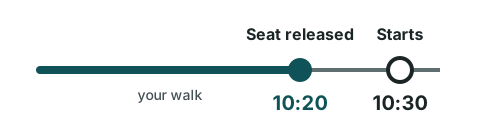
The seat is released before the session starts
A reserved seat is only held until 10 minutes before the session starts, then it goes to the walk-up line. This rule comes from the official re:Invent 2026 FAQ.
Most tools show:
Starts 10:30
Compass shows:
Seat released at 10:20
and the walk from where you are.
First-timers lose seats by arriving late, by underestimating walks between hotels, and by skipping meals and rest.
| Airline term | re:Invent meaning |
|---|
| Itinerary | The attendee's week (a Kiro spec) |
|---|
| Boarding pass | Unofficial pass for one reserved session |
|---|
| Gate | Venue and room |
|---|
| Boarding closes | Session start minus 10 minutes |
|---|
| Connection | Walk between two consecutive commitments |
|---|
| Tight connection | Walk time plus buffer is longer than the gap |
|---|
| Rebooking | Moving to a repeat of the same session (-R in the session code) |
|---|
| Standby | Favorites kept as backups |
|---|
| Layover | Personal time for meals, water and rest |
|---|
| Cancelled flight | A cancelled reservation: its pass is voided |
|---|
Plan, Board, Fly
Plan
Plan on your computer, inside Kiro or another MCP client.
- Your repo is your agenda. Compass scans your own workspace on your machine (Terraform, AWS CDK TypeScript, AWS SDK for JavaScript v3 and boto3), works out which AWS services you use and how deeply, and suggests a level for each topic. Only service names and depth leave the scanner, never file contents.
- Your week becomes a spec. Compass writes a Kiro spec for your week with requirements, a design and tasks. Each task is one API action that you approve.
- First-timer guardrails. Every booking is checked for connection time, boarding time, clashes and layovers inside the Compass server before it is sent. Kiro hooks run the same check first as a second line of defence.
Board
Board on any device, from the phone in your pocket.
- Compass issues a boarding pass for each reserved session, for Apple Wallet and Google Wallet.
- Each pass shows the session code and title, the venue and room, "Seat released at", the walk from the previous session and the next connection.
- A QR code on your computer opens a 15-minute page on your phone, where you choose Add to Apple Wallet, Save to Google Wallet or download the calendar file.
- The calendar file works with no setup and carries alarms for "leave now" and "boarding closes".
Fly
Keep your passes right while the week changes.
- When your schedule changes, Compass reads GetSchedule, which is the source of truth, compares it with the passes it issued, and reissues or withdraws passes.
- A full session gets a rebooking suggestion: the repeat, a favorite on standby, or a walk-up option.
- A cancelled session voids its pass, and every pass expires when its session ends.
Three promises
The badge is the ticket
Compass passes are reminders. Your own badge is what gets you into a room.
Passes have no barcode.
A human approves every write
Never reserve, cancel or change anything in the background.
No seat polling, sniping or retry loops on reservations.
Local first
Your tokens, the catalog cache, your schedule and the code scan stay on your machine.
Unofficial, and proud of it
Compass passes are unofficial. Every pass says the line above, and a pass never replaces your badge.
Unofficial. Your badge is your ticket.